


Hear Through Walls
4.454.00 Reviews
App Specs
- Version
- 17.1.0
- Updated On
- License
- Free
- Downloads
- 50,000+
- Developer
- Battery Stats Saver
- Categories
- Medical
- Platform
- Android
Screenshots
 Analysis by AppCompare
When I test an app that promises to make distant sounds easier to hear, I start with a practical question: what can a phone microphone realistically pick up, and what does amplification actually change? Hear Through Walls is built around that one idea. It uses the device’s microphone to capture nearby sound and make it louder, which can help when a sound is faint or coming from another room. It does not give a phone the ability to see through a wall or make every voice intelligible, so I would approach the name as a description of the intended use, not a guarantee.
What amplification can—and cannot—do
The most useful way to think about this medical-category app is as a simple listening aid for situational use, rather than a replacement for hearing equipment. Making a microphone signal louder can bring a quiet sound forward, but it also raises background noise. If a television, fan, traffic, or several people are audible at once, turning up the volume may make the whole mix louder instead of isolating the one sound you want.
That distinction matters especially with walls. Sound loses detail as it travels through barriers, and a phone microphone cannot recover information that never reaches it clearly. A thin partition in a quiet home is a more plausible test than a thick wall beside a busy street. I would not rely on it to understand private conversations, identify an urgent sound from far away, or make decisions that require dependable hearing.
How to get a more useful listening test
Start in a quiet room and listen at a comfortable volume before trying to hear anything at a distance. Move the phone a little at a time, keeping its microphone aimed toward the source where practical. Small changes in position can matter more than repeatedly pushing the volume higher, particularly when the sound is being muffled by a doorway or partition.
Headphones can make the amplified signal easier to hear without playing it through the phone speaker, which is helpful when you want to listen discreetly or avoid disturbing someone nearby. They do not improve the microphone’s ability to capture a sound, though. If the source is too faint or masked, headphones will not turn an unclear signal into a clear one. I would also keep the listening level moderate and pause if the amplified audio becomes uncomfortable.
A realistic use at home
Imagine you are preparing dinner while a child plays in the next room. Rather than repeatedly walking away from the stove, you could briefly use the phone to check whether the room is quiet or whether you can hear activity. This is a limited check, not a dependable monitor: the phone needs to be positioned where it can pick up sound, and cooking noise may compete with what you are trying to hear.
That kind of short, nearby check is a better fit than leaving the app to supervise a room for an extended period. For ongoing child monitoring, a purpose-built baby monitor is generally more suitable because it is designed around that job. For a quick, occasional listen, this app may be convenient if you already have your phone with you and understand the limits of microphone amplification.
Worth Reading Before You Choose

EA SPORTS FC Mobile 26 Is a Bigger Football Game, but It Takes Time

Flipboard Shows What News Apps Must Do Beyond the Feed

Switching to Android Auto Means Rethinking Your Driving Routine

Google Calendar Makes a Crowded Week Easier to Manage

Ludo King Makes the Most of the Minutes Between Plans

Baby Panda World Brings Quick Play to Modern Phones, but Its Game Library Feels Busy
Where it fits among other options
Compared with simply asking someone to repeat themselves or moving closer, an app is convenient but less reliable. Compared with a dedicated hearing device, it is a lightweight experiment rather than a tailored solution. A hearing aid or a consultation with a qualified hearing professional is a better direction when difficulty hearing is frequent, affects conversations, or creates safety concerns. The phone app may help in a moment, but it should not be treated as diagnosis or treatment.
There is also a privacy difference between listening to your own surroundings and trying to capture other people’s conversations. I would use it only for a legitimate purpose, in a way that respects the people nearby, and avoid recording or monitoring anyone without their knowledge and consent. The fact that a microphone can pick up a sound does not make every use appropriate.
What Exactly Is Hear Through Walls?
The Hear Through Walls app claims to enhance your auditory abilities to hear sounds and conversations from a distance, or even through walls. Sounds like something out of a spy movie, right? But before you rush to download it, let's break down how it works and what you can expect.
Getting Started: The Installation
Installing the app is pretty straightforward. Available on both Android and iOS, it’s a quick download from the app store. Once installed, you’ll be greeted with a simple interface that’s easy on the eyes and user-friendly. I appreciate apps that don’t bombard me with a steep learning curve, and this one fits the bill.
It is a free app from Battery Stats Saver, with optional in-app purchases ranging from $0.99 to $99.99 per item. Its current version is 17.1.0, and it requires Android 8.0 or later on Android. The audience rating is Everyone. Those details make the basic download easy to consider, but I would check the purchase screen carefully before choosing anything paid and decide whether the simple listening function is enough for me.
The Interface: Simple Yet Effective
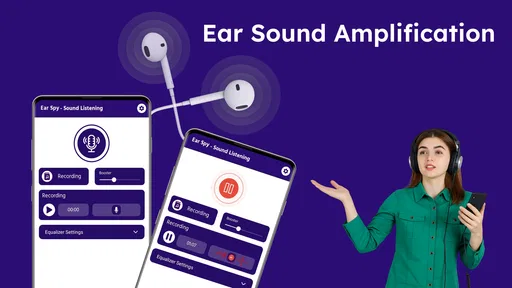
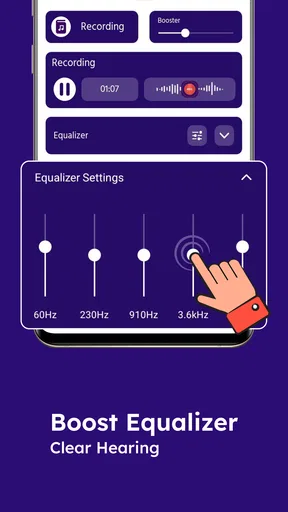
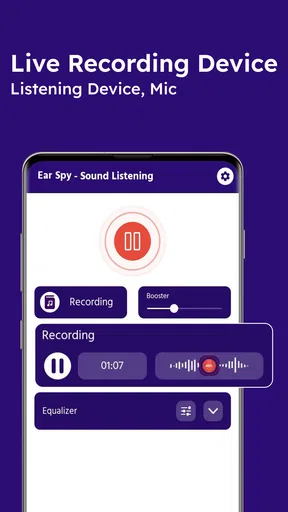
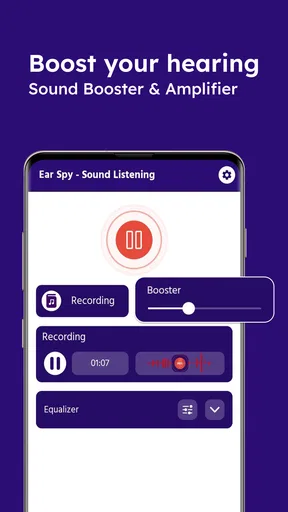
The interface is clean and minimalistic, which is a huge plus in my book. You have a few basic controls to adjust the sensitivity and volume. The app uses your device’s microphone to capture sounds and amplifies them. You might want to plug in some headphones for better clarity, and trust me, you’ll want to avoid broadcasting your eavesdropping endeavors to the entire room!
A useful habit is to change one thing at a time. If a faint sound is hard to pick out, first try moving the phone, then listen again before adjusting sensitivity or volume. Changing several controls together makes it difficult to tell whether the improvement came from positioning or amplification. I would also test the setup with a familiar sound at a safe, comfortable level before using it for anything that matters.
Performance: Does It Deliver?
Now, the big question: does it actually work? In my experience, the app does a decent job of amplifying sounds, but it’s not exactly magic. The effectiveness largely depends on the thickness of the wall and ambient noise. Don’t expect crystal clear sound if you’re trying to hear through a concrete wall with a party going on next door.
However, in quieter environments or with thin walls, it does enhance your ability to catch distant sounds. It’s not perfect, but for an app on your phone, it’s pretty nifty.
One trade-off is that a louder signal can feel more convincing even when it has not become more informative. I would listen for a clear change in the sound itself, rather than assume that more volume means better understanding. If the result is mostly hiss, room noise, or indistinct voices, repositioning may be worth a try; if that does not help, I would stop rather than keep raising the level.
Practical Uses: More Than Just Eavesdropping
While the idea might sound a bit sneaky, there are legitimate uses for this app. Parents might use it to keep an ear out for their kids playing in another room, or perhaps you’re trying to catch a part of a conversation you missed in a meeting (provided everyone’s okay with it, of course).
It’s also quite handy for those with mild hearing difficulties who might need a bit of help amplifying the sounds around them.
For a meeting, I would only use it openly and with the other people’s agreement. It may help bring a distant speaker’s voice forward in a quiet room, but it is not a substitute for asking someone to repeat a point, moving closer, or using the meeting’s own accessible audio setup. When speech matters, those direct options are more dependable than hoping a phone microphone will separate one voice from the rest.
The app has an average rating of 4.6 from 153 ratings, with 23 written reviews, and has passed 10K+ installs. I take that as a sign that people have tried it, not proof that it will perform equally well in every room or for every listener. It was released on Apr 24, 2024, and its medical category is worth keeping in perspective: a general-purpose phone app can offer practical amplification, but persistent hearing problems call for professional advice.
Final Thoughts: Is It Worth a Try?
If you’re curious and feel like trying out a cool little gadget on your phone, the Hear Through Walls app is worth a download. It’s not going to turn you into a super spy overnight, but it’s a fun tool to experiment with. Just remember to use it ethically and respect others’ privacy.
I think it is best suited to someone who wants an occasional, low-effort way to make nearby sounds easier to notice, understands that walls and noise limit the result, and is comfortable experimenting with phone placement. I would skip it if I needed reliable remote monitoring, clear speech through substantial barriers, or a consistent solution to hearing loss. In those situations, a purpose-built device or professional support is a more sensible choice.
So, there you have it! Give it a whirl and see how it works for you. Whether you’re using it for fun or practical purposes, it’s a neat app to have in your digital arsenal.
Pros
- Enhances ambient sounds effectively.
- User-friendly interface design.
- Low battery consumption.
- Customizable sound filters.
- Supports multiple audio sources.
Cons
- Limited functionality without headphones.
- Occasional audio lag issues.
- No built-in tutorial for beginners.
- Requires stable internet for updates.
- Some features locked behind paywall.
FAQs for Hear Through Walls
What is Hear Through Walls, and how does it work?
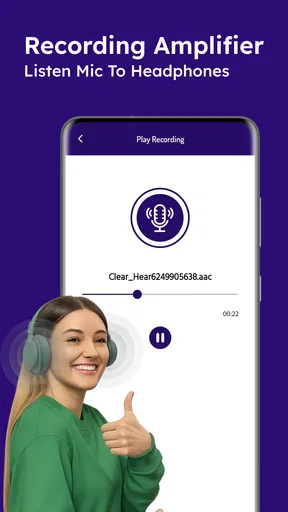
Hear Through Walls is an innovative app designed to amplify sound from your surroundings using your device’s microphone. It processes the audio and plays it through your headphones, potentially allowing you to hear conversations or sounds from a distance. Ensure to use it responsibly and ethically.
Is Hear Through Walls legal to use in my area?
The legality of using Hear Through Walls depends on your local laws regarding privacy and surveillance. It’s crucial to check your jurisdiction’s regulations before using the app, as unauthorized recording or eavesdropping may be illegal and could lead to serious consequences.
What are the main features of Hear Through Walls?
Hear Through Walls offers features such as real-time audio amplification, customizable sound filters, and an intuitive user interface. It allows users to adjust the sensitivity and range of sound capture, making it versatile for different environments. The app also supports various headphone types for optimal sound delivery.
Are there any risks associated with using Hear Through Walls?
Using Hear Through Walls can pose privacy concerns if used improperly. Additionally, prolonged exposure to loud sounds may damage your hearing. Always use the app responsibly, respecting the privacy of others, and ensure the volume is kept at a safe level to protect your ears.
What devices are compatible with Hear Through Walls?
Hear Through Walls is available for both Android and iOS devices. It requires a device with a functioning microphone and supports most modern smartphones and tablets. For the best experience, ensure your device is running the latest operating system version and has sufficient processing power to handle audio processing.


